Sound System / Media Player (WHO = 16)
This guide explains how to configure and automate the BTicino / Legrand Diffusione Sonora (Sound System) in Home Assistant using the MyHOME integration.
🎵 Subsystem Architecture
In MyHOME systems, multi-room audio is managed by dedicated hardware analog matrices and room amplifiers communicating over the SCS bus using OpenWebNet WHO = 16.
Supported Hardware
- Audio Matrix: F441, F441M (4 stereo source inputs S1–S4, up to 8 independent stereo room amplifier environment outputs over the 2-wire SCS bus)
- Audio Source Interfaces: L4561N / L4561 (stereo source interface with RCA line inputs and IR emitter control, 4 DIN modules), L4560 / HS4560 / N4560 / NT4560 / HC4560 (flush-mount modular RCA line-in sockets), 3482 (auxiliary line-in preamplifier / interface), 3495 (source isolator with 1500 Vrms galvanic isolation for ground loop and hum elimination)
- FM Tuner Modules: F500, F500COAX (WHO 16 FM RDS stereo tuner modules, 4 DIN modules)
- Room Amplifiers: H4562, L4562 (flush-mount stereo room amplifiers), F502 (DIN rail stereo room amplifier, 230 Vac powered), 3484, 3484/1, 3487 (modular stereo/mono amplifiers)
- Audio Controls & Accessories: H4651/2, L4651/2 (special controls), HC/HS4563, L/N/NT4563 (rotary controls), HC/HS4653/2, HC/HS4653/3 (soft-touch controls), H/L4684 (colour touchscreen), 3529 (wall control panels), 3499 (bus line terminators), 346000 (SCS bus power supply)
Important
Hardware-Only Analog Matrix: The BTicino F441 / F441M is a purely analog matrix switcher. It does not contain an Ethernet port or digital audio decoder and cannot stream IP audio by itself. It routes line-level analog signals from physical source inputs (Source 1 to Source 4) to its room outputs, one output per environment. Amplifiers are addressed EA (01–99): environment digit, then amplifier number within it.
🧭 How It Fits Together (Start Here)
New to the audio feature? This section answers the foundational questions that come up first: how physical wiring and SCS bus commands work, why you never group your streamer with a room, and how to expose your zones in Music Assistant. The rest of the page goes into deep architectural and protocol details.
What is connected to what
Music Assistant / Home Assistant
        │  1. Play, pause, volume target the ROOM entity: media_player.<room> (e.g. Bathroom)
        ▼
MyHOME Dynamic Proxy
        ├──► OpenWebNet WHO=16 over 2-wire SCS Bus (CONTROL)
        │       ├── Routes matrix environment output to matrix input S1..S4
        │       └── Wakes & powers room amplifier ──► Speakers
        │
        └──► Claims free decoder & sends stream URL over IP
                ▼
        Network Streamer / Decoder (WiiM, Squeezelite, Cambridge Audio, DLNA...)
                │  Analog stereo line out (RCA / 3.5mm jack)
                ▼
        Audio Source Interface (Legrand / BTicino L4561N, 3482, L4560)
                │  2-wire SCS Bus (modulates stereo audio onto the bus)
                ▼
        F441 / F441M Audio Matrix (Source Inputs S1..S4)
                │  2-wire SCS Bus per Environment (carries audio + commands)
                ▼
        Room Amplifiers (H4562, F502, 3484/3487)
                │  Local speaker wires (L / R)
                ▼
        Room Speakers
| Part | What it does | Connection |
|---|---|---|
| Streamer ("decoder") | Receives the stream from Music Assistant or Home Assistant over IP and converts it into analog line-level audio. | Ethernet / Wi-Fi network in; analog stereo line-level out (RCA / 3.5mm). |
| Audio source interface (L4561N / 3482 / L4560) | Accepts line-level stereo analog audio from the streamer and modulates it onto the 2-wire SCS bus to a matrix source input (S1–S4); provides presence signaling on the SCS bus. | Analog line audio in; 2-wire SCS bus connection to matrix source input (S1–S4). |
| Source isolator (3495) | Optional galvanic isolator (1500 Vrms) installed between streamer and source interface for Class I or multiple Class II devices to eliminate 50/60 Hz ground loops and hum. | RCA IN from streamer; RCA OUT to source interface. |
| F441 / F441M matrix | Switches one of its four 2-wire SCS stereo source inputs (S1–S4) to each room environment output over the 2-wire SCS bus. It has no network audio. | 2-wire SCS inputs (S1–S4) from source interfaces; 2-wire SCS outputs to room environments. |
| Room amplifiers (H4562, F502, 3484/3487) | Receives both digital OpenWebNet control frames and modulated stereo audio over the 2-wire SCS bus; powers the room speakers. | Switched on, off and volume-regulated over the 2-wire SCS bus; audio demodulated from the same 2-wire SCS bus; local copper speaker wires (L/R) to speakers. |
| MyHOME integration | Ties the three together: wakes the amplifier, routes the room, forwards the stream to a free streamer. | Gateway (SCS bus) and Home Assistant service calls. |
The 2-Wire Architecture: Audio & Control Multiplexing & Stereo Sound
A common question is: "How can you have stereo sound with only 2 wires, and why do I need an audio interface like the L4561N?"
- Audio and commands travel together over the same 2-wire SCS bus. In BTicino MyHOME Diffusion Sonore 2 Fils (2-Wire Sound System), the physical 2-wire SCS bus (white/grey twisted pair) simultaneously carries 27V DC power, digital OpenWebNet control frames (WHO = 16: power, volume, source routing, FM frequency tuning), and high-frequency modulated stereo audio across the very same two conductors. There is no separate analog audio cabling running between the matrix and the room amplifiers; the 2-wire SCS bus carries the music directly to each room.
- Why an audio source interface is required for external streamers. External network streamers (WiiM, Squeezelite/Raspberry Pi, DLNA DACs, Cambridge Audio, CD players, etc.) output standard baseband analog line-level stereo audio (0.7–2.0 V RMS via RCA or 3.5mm jack). They cannot connect directly to SCS bus screw terminals. A Legrand / BTicino audio source interface—such as the L4561N / L4561 (4-DIN stereo control module with RCA inputs and IR emitter output), L4560 / HS4560 / N4560 / NT4560 / HC4560 (modular flush-mount RCA sockets), or 3482 (auxiliary line-in preamplifier)—is the physical bridge that takes line-level stereo analog audio and modulates/injects it directly onto the 2-wire SCS bus into one of the matrix source inputs (S1–S4).
- Galvanic isolation (art. 3495) for ground loops & hum. When connecting external Class I audio sources (equipment with an earth ground connection, such as a desktop PC or earthed Hi-Fi amplifier) or multiple Class II sources, BTicino strongly recommends placing a 3495 source isolator between the streamer and the source interface. It provides 1500 Vrms isolation to preserve the SELV safety rating of the MyHOME SCS bus and prevent 50/60 Hz ground hum.
- Stereo distribution and speaker wiring. The F441 / F441M matrix and SCS audio bus transmit a true stereo (L/R) signal. Each room environment ("Ambiance") is wired with a single 2-wire SCS bus daisy-chained across room amplifiers (e.g. flush-mount H4562 / L4562 or DIN rail F502) and control panels (H4651/2, H4684), ending at a 3499 bus termination resistor. The amplifier in the room demodulates the stereo signal and drives the room's speakers over standard local copper speaker wire (Left and Right).
Official BTicino 2-Wire Sound System Wiring Schematic
The schematic below from the official BTicino MyHOME Diffusion Sonore documentation illustrates how external stereo audio sources, the F441 matrix, and multi-room environment zones all interconnect using the 2-wire SCS bus:
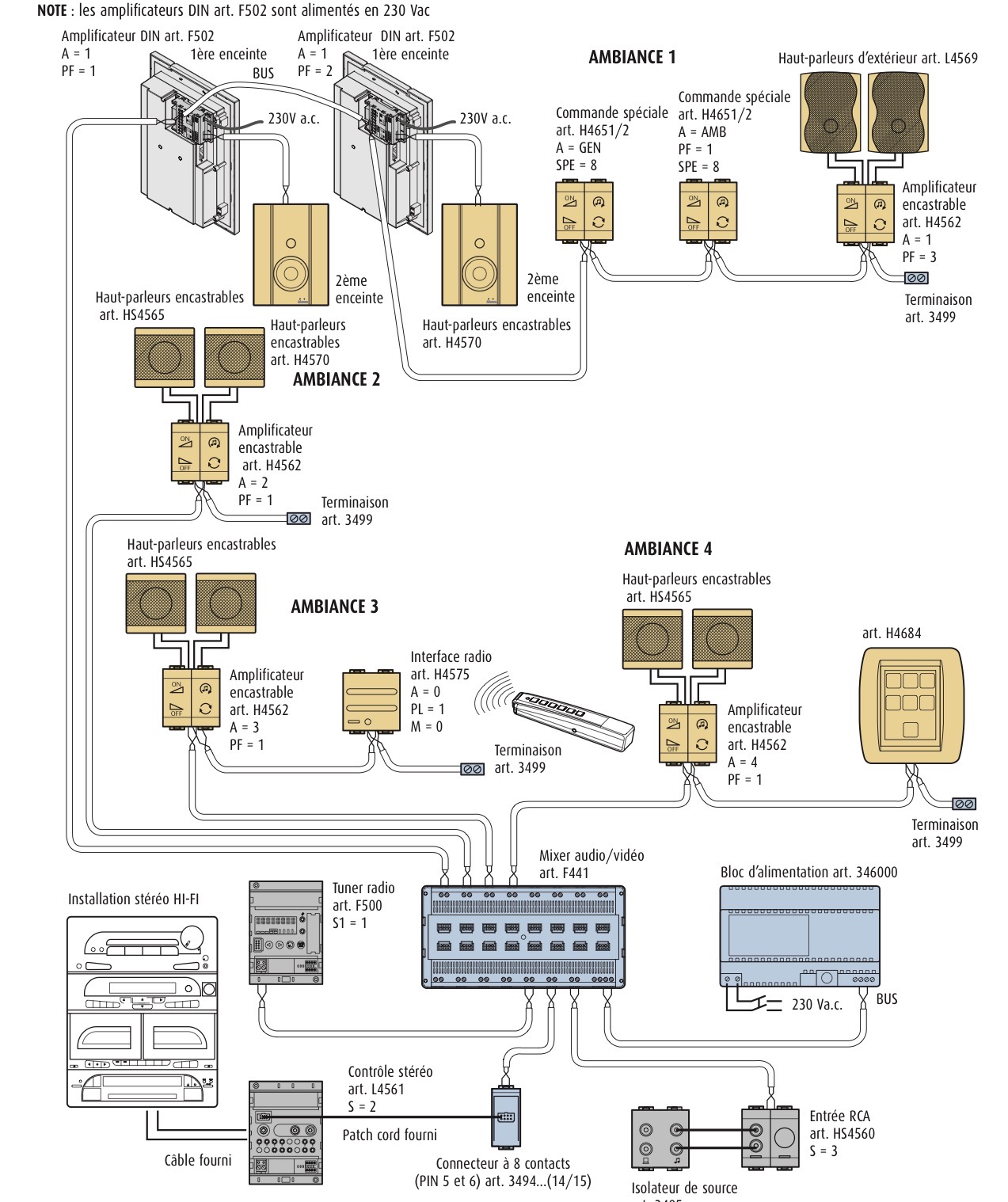 Figure: Official BTicino MyHOME Diffusion Sonore 2 Fils system architecture and wiring schematic (from catalog 3495). At the bottom: audio sources (F500 RDS tuner, Hi-Fi via L4561 stereo control and 3494 connector, external RCA input via HS4560 and 3495 source isolator) connect to matrix inputs over the 2-wire SCS bus. In the center: F441 matrix and 346000 power supply. At the top: four room environments (Ambiance 1–4) receive 2-wire SCS bus lines driving flush-mount amplifiers (H4562), DIN amplifiers (F502), special controls (H4651/2), and touchscreens (H4684), terminated with 3499 bus line terminators.
Setting it up, step by step
- Cable the hardware: Connect the analog line output of each streamer into an audio source interface (e.g. L4561N, 3482, or L4560) connected to a free F441/F441M source input (S1–S4).
- Add the streamer to Home Assistant: Use its native integration (for example Squeezelite via Music Assistant's Slimproto provider, WiiM, Cast, or DLNA DMR). It must show up as an active
media_playerentity. - Configure MyHOME Options: Open Settings → Devices & Services → MyHOME → Configure:
- Source names (Source 1–Source 4): name what is physically wired to each input (e.g.
S1 — WiiM Streamer) and leave unused inputs blank. - Default source per environment (optional): set which source a room starts on when switched on.
- Decoder rows (up to 4): map each streamer's
media_playerentity to its matrix input (S1–S4), and set an optional pre-gain offset (e.g.+15%). See Gain Staging.Note
Mapping at least one decoder in this step is what unlocks streaming support (
play_media) on your MyHOME room entities. - Check the room entities: Each amplifier zone appears as a
media_playerentity under the MyHOME gateway. - Set up Music Assistant:
- Add the Home Assistant Player Provider in Music Assistant (Settings → Providers → Add Provider → Home Assistant).
- Under provider settings, select and enable your MyHOME room amplifier entities (
media_player.<room>). - For smooth multi-room listening across the whole house, create a Sync Group with Dynamic members ON.
- Dashboard: The stock
media-controlandtilecards work directly on the room entities. See Dashboard Display for ready-made cards, including dynamic cards that only display actively playing rooms.
Streamer vs. Room Zone: Never Group the Streamer with a Room
Another frequent question is: "My streamer is Livingroom 1_3519, but I want to listen in the Bathroom. Should I create a group containing Livingroom 1_3519 and Bathroom so both play?"
Caution
NEVER group your backend streamer with a destination room in Music Assistant or Home Assistant.
Here is why and how the Dynamic Proxy architecture works:
- Understand the distinct roles:
- Backend Streamer / Decoder (e.g.,
media_player.livingroom_1_3519, WiiM, Squeezelite): This is the physical hardware audio streamer plugged into the matrix input. It is registered in the MyHOME Decoder Pool (via Configure → Decoders). It serves as an internal audio feeder. You do not target it for playback, and you do not add it to speaker groups. - Destination Room (e.g.,
media_player.bathroom_sound): This is the BTicino room amplifier powering the speakers in that room. - How to play music in a room (e.g. Bathroom):
- Simply select the Bathroom player in Music Assistant (or Home Assistant) and press play!
- You do not touch or select
Livingroom 1_3519. - Behind the scenes, the MyHOME integration automatically:
- Claims a free streamer (
Livingroom 1_3519) from the pool. - Wakes and powers on the Bathroom amplifier over the SCS bus.
- Routes the Bathroom environment to Source 1 on the F441/F441M matrix.
- Streams the audio URL to
Livingroom 1_3519. - Mirrors the track title, artist, album art, and volume back onto
media_player.bathroom_sound.
- Claims a free streamer (
- What happens if you group the streamer with the room:
- Music Assistant attempts to stream simultaneously to both the physical streamer (
Livingroom 1_3519) and the virtual room proxy (Bathroom). This causes duplicated streams, desynchronized playback, queue collisions, or feedback loops. - When do you use groups?
- Groups are used only when you want to play the same audio across multiple destination rooms at the same time (e.g.,
Bathroom+Kitchen+Living Room). - Even in a multi-room group: only add the MyHOME room entities — never add the backend streamer!
Exposing MyHOME Rooms in Music Assistant (Home Assistant Player Provider)
If Music Assistant does not list your MyHOME amplifier rooms:
- Add the Player Provider: Music Assistant does not expose Home Assistant media players automatically. In Music Assistant, navigate to Settings → Providers → Add Provider → Home Assistant (Player Provider).
- Connect to Home Assistant: Provide your Home Assistant URL and token (or confirm the auto-discovered connection).
- Enable MyHOME Rooms: Under the player provider settings, select and enable the MyHOME room amplifier entities (
media_player.<room>) you want to use. - Configure Decoders in MyHOME: A MyHOME room entity only advertises
play_media(streaming support) once at least one decoder is mapped in the MyHOME integration options (Settings → Devices & Services → MyHOME → Configure → Decoders). If no decoders are configured, the room operates in standalone fallback mode (volume/source only) and Music Assistant will not accept stream commands for it.
Choosing a streamer & Bluetooth considerations
Any network streamer with an analog output works as long as Home Assistant can play a stream URL on it. A wired network connection is the most reliable (such as a Raspberry Pi running Squeezelite/piCorePlayer, WiiM Pro, or Cambridge Audio).
Warning
Avoid Bluetooth for Streamers: Attempting to use a Raspberry Pi or other device as an audio source via Bluetooth often leads to choppy audio, dropouts, and stutter. This is caused by RF interference (especially if the device sits near a Wi-Fi router) and Bluetooth audio stack latency. Bluetooth sources are outside what this integration manages. A wired or networked streamer connected to the audio source interface is strongly recommended. See also Backend Stream Compatibility.
🔀 The Dynamic Proxy Architecture
To bridge modern streaming platforms (such as Music Assistant, Spotify Connect, or Squeezelite / LMS) into the analog BTicino matrix without audio artifacts, the MyHOME integration implements the Dynamic Proxy pattern.
┌──────────────────────────────────────────────┐
│  Home Assistant / Music Assistant (Player)   │
│  "media_player.living_room_sound"            │
└──────────────────────┬───────────────────────┘
                       │ (Proxy Layer)
                       ▼
         ┌───────────────────────────┐
         │ Decoder Pool Management   │
         │ - Dynamic claim / release │
         │ - Pre-gain (% offset)     │
         │ - State & metadata mirror │
         └─────┬───────────────┬─────┘
               │               │
      [IP Service Call]   [OpenWebNet WHO 16 Control]
               │               │ (Power, Volume, Routing)
               ▼               ▼
       ┌───────────────┐ ┌───────────────┐
       │ Audio Streamer│ │ F441 / F441M  │
       │ (WiiM / Pi /  │ │ Audio Matrix  │
       │  Cambridge)   │ │ & Amplifiers  │
       └───────┬───────┘ └───────▲───────┘
               │ Analog Line-Out │
               ▼                 │ 2-Wire SCS Audio Bus
       ┌───────────────┐         │ (Inputs S1..S4)
       │ Audio Source  ├─────────┘
       │ Interface     │
       │ (L4561N/3482) │
       └───────────────┘
Source switching
Selecting a source sends the same two frames a wall panel puts on the bus:
| Frame | Meaning |
|---|---|
*16*3*10S## |
Activate source device S |
*16*3*1ES## |
Route environment E to source S |
The routing address carries the environment digit of the amplifier
address, not the amplifier digit. Amplifier addresses are EA — environment
followed by amplifier — so zone 23 lives in environment 2 and is routed with
121 (source 1) or 122 (source 2). The F441M switches per output and an
output serves a whole environment, so every amplifier in that environment
follows the switch. Zones 22 and 23 cannot play different sources; that is
matrix hardware, not an integration limitation. The integration holds to it:
- One stream per environment. While zone 22 streams from a decoder,
play_mediaor a source change on zone 23 is refused with an error naming zone 22, instead of silently switching zone 22 off its stream. - Environment 0 cannot be switched. Amplifiers
01–09would be routed with10S, which is the source device address itself. Source selection is refused there and no default can be set for it; use a wall panel. - Only two-digit amplifier addresses are routed. The WHO=16 address table
lists amplifiers as
01–99. A single-digit address such as1in a YAML configuration does not say which environment it belongs to (01or11?), so it is never routed. Write the address with both digits.
Earlier releases refused to send these frames, on the assumption that they caused relay clicks on MH200-class gateways. Bus captures on an MH200 show clean switching. The real problem was a routing address built from the wrong digit, which addressed an environment that did not exist.
Naming your sources
Each F441M input (S1–S4) has a name field in the integration Options. Fill in what is physically wired to it and leave the rest blank.
- Only named sources are offered in the Home Assistant source list.
- A zone routed to a blank input — typically by someone pressing a stale
button on a wall panel — is labelled
Source N (not configured)and logged once, so amplified silence or tuner hiss has a visible cause. - Routing chosen at a wall panel is never overridden. The user pressed a button in the room, and silently switching it back would be its own surprise. Select a configured source to recover.
If no names are configured the legacy Source 1–Source 4 list is used and
nothing is flagged, so existing installations are unaffected.
Default source per environment
For every environment that has audio zones, the Options offer a default source. It is set per environment, not per zone, because two amplifiers in one room share a matrix output and cannot sit on different inputs.
- The default is applied when a zone is switched on from Home Assistant, so a room left on a stale input comes back on the right source.
- It is not applied to a zone that is already on, nor while another zone of the environment is streaming.
- It never overrides routing announced by a wall panel.
- Leave routing as it is (the default) keeps the existing routing.
- After a Home Assistant restart the bus cannot be asked which input a room is on, so the default stands in for it. A room that was on the tuner while the default is a decoder that is not playing can therefore switch itself off a few seconds after the restart. Turn it back on and it stays on. See Rooms nobody owns follow the music off below.
Environment 0 is not offered: it has no routing address.
Routing when streaming
Once sources are named, or a default source is set for an environment,
play_media routes the zone's environment to the input its decoder is wired
to, and turning a zone on routes it to its environment default. A zone that is
already on is not re-routed when it is turned on again, and a default is not
applied while another zone in the environment is streaming.
Without either setting the integration does not route while streaming and relies on the "Hardware Routing First" model below, as earlier releases did.
Tuner sources (F500 / F500N)
A matrix input can hold a tuner rather than a line interface. Tick Source N
is a tuner in the options and the integration creates a dedicated Audio Source
device with four entities alongside the amplifier zones:
media_player.<source>— power, preset dropdown (Station 1–Station 15), next/previous preset, RDS title, and Home Assistant Media Browser (BROWSE_MEDIA)number.<source>_frequency— direct manual FM frequency input & stepping (87.50–108.00 MHz,0.05 MHzstep, box mode)button.<source>_seek_up&button.<source>_seek_down— one-tap hardware FM auto-seek buttons
| Home Assistant | OpenWebNet (WHO 16 / WHO 22-only gateways) |
|---|---|
| On / off | *16*3*10S## / *16*13*10S## (or *22*1*2#S## / *22*0*2#S##) |
| Next / previous track | next / previous station (*16*6001*10S## / *16*6101*10S##, or *22*9*2#S## / *22*10*2#S##) |
| Source list | stored stations (defaults to 1–5 for F500, dynamically expands up to 1–15 for F500N: *#16*10S*#7*<N>## or *#22*2#S*#6*<N>##) |
Manual frequency (number.<source>_frequency / myhome.tuner_set_frequency) |
87.50–108.00 MHz (*#16*10S*#6*0*<kHz>## or *#22*2#S*#5*1*<10kHz>##) |
Seek up / down (button / myhome.tuner_seek_up & tuner_seek_down) |
*16*5000*10S## / *16*5100*10S## (or *22*5*2#S## / *22*6*2#S##) |
Store preset (myhome.tuner_store_station) |
*#16*10S*#10*<1–5>## (or *22*33#<1–15>*2#S## for slots 6–15 and WHO 22-only gateways) |
Media Browser (BROWSE_MEDIA) & play_media (channel) |
"1"–"15" selects a station; anything else is read as MHz, so "105.3" tunes to 105.30 MHz |
media_title |
RDS text, reported as ASCII codes on WHO 16 DIMENSION 8 / WHO 22 DIMENSION 10 |
frequency attribute |
WHO 16 DIMENSION 6 / WHO 22 DIMENSION 5 & 11, in MHz |
station attribute |
WHO 16 DIMENSION 7 / WHO 22 DIMENSION 6 & 11 |
The entity asks the tuner to start reporting RDS (*16*101*10S##, or *22*31*2#S## on WHO 22-only gateways such as MyHomeServer1 and F461) when it is added, although modern tuners broadcast their RDS text autonomously when active.
Two notes on the frames, both from the specification rather than choice: a
station write carries its parameter directly (*#16*101*#7*3##) while the
report prefixes it with a zero (*#16*101*7*0*3##), and frequencies are
described as "expressed in Hz" while every example in the same document uses
kHz. The integration follows the examples.
Why declare it instead of detecting it: a source device that has not spoken is indistinguishable from one that is not there, and a tuner in standby says nothing at all.
Tested on real hardware. Frequency tuning (
*#16*10S*#6*0*<kHz>##with leading zero; write without zero is ignored), hardware seek up / down (*16*5000*10S##/*16*5100*10S##), station stepping (*16*6001*10S##/*16*6101*10S##), station selection (*#16*10S*#7*<N>##), kHz frequency parsing, autonomous RDS text (DIMENSION 8), and dual-stackWHO 16+WHO 22(5#2#S/2#S) tuner telemetry & standby transitions are hardware-verified against liveMH200N+F500N(@manfredgittmaier-afk, PR #427) andH/L4684FW6.0.11+F500(@andrea-mag, Issue #466) installations.
The "Hardware Routing First" Model
For installations that have not named their sources, play_media leaves the
matrix routing to the wall panels.
Recommended Practice:
- Physical Cabling: Connect the analog output of your network streamer (e.g. Raspberry Pi running Squeezelite, WiiM Pro, Cambridge Audio) into physical Source 1 on the F441M matrix.
- Matrix Configuration: Configure your room amplifiers (or physical wall panels) to stay routed to Source 1.
- Automated Power Sequence: When a stream starts, the integration proxy:
- Claims an idle decoder from the shared Decoder Pool.
- Wakes the decoder if it is in standby.
- Powers the BTicino amplifier on with an OFF → ON sequence (
*16*13*<WHERE>##, then*16*3*<WHERE>##) if it is not already on. - Forwards the stream URL to the streaming decoder.
- Mirrors track metadata (title, artist, album art) and state back onto the Home Assistant room entity.
- Shutdown & Release: When the zone is turned off, the amplifier powers off (
*16*13*<WHERE>##), playback on the decoder is stopped and the decoder is released back to the idle pool.
🎛️ Gain Staging & Bus Noise Elimination
Analog SCS audio matrices can suffer from faint ground-loop hum or bus hiss if the input signal level is too low and the room amplifiers have to be turned up to ~75% to reach normal listening volume.
The MyHOME integration features fixed line-level hardware gain staging: $$\text{Decoder Volume} = \min(1.0,\; 0.75 + \text{Pre-Gain Offset})$$
- When
pre_gainis0(Pre-Amp OFF), the backend decoder's volume is left untouched. - Setting
pre_gain > 0(e.g.,+20%→95%feed volume, or+25%–+100%→100%full line-level feed) drives the network streamer at a fixed high line-level feed as soon as playback starts, resumes, or a multi-room group is joined / handed over / unparked, independent of any individual room's volume slider. - Once the backend decoder reports that target
volume_levelin Home Assistant, subsequent room volume adjustments skip redundantmedia_player.volume_setcalls on the streamer unless its feed volume drifted. - Room volume changes (
0–31on the BTicino amplifier) control only the room's own speaker loudness and never throttle the shared streamer feed in multi-room groups. Conversely, changing the streamer's volume in a vendor app (e.g. Cambridge StreamMagic) does not move the Home Assistant room volume slider, which always reflects the BTicino amplifier on the SCS bus. - Because the analog feed into the F441M matrix stays near full line level, each room amplifier operates at much lower gain (typically 20%–40% instead of 75%), pushing the 2-wire SCS bus noise floor well below audibility.
A volume of 0 is not a mute
Turning a room down to 0, from Music Assistant or a wall panel, leaves it unmuted: only the mute button mutes. Music Assistant greys out the slider of a muted player and leaves it out of the group volume, so a room that reports 0 would otherwise be stuck there until you pressed the mute icon. Raising the volume above 0 (from anywhere) ends a mute. A volume of 0 does not affect the anti-hiss auto-off, which only follows the decoder: when the stream stops, the room's amplifier still switches off.
⚙️ Configuration via Home Assistant UI
Sources, defaults and the Dynamic Proxy are all configured in the integration's Options Flow:
- Go to Settings -> Devices & Services -> MyHOME.
- Click Configure.
- Source names (Source 1–Source 4): name what is wired to each F441M input and leave unused inputs blank. See Naming your sources.
- Default source for environment N (one field per environment with audio zones): pick a source, or keep Leave routing as it is. See Default source per environment.
- Decoder mapping, one row per streaming decoder (up to 4):
- Media player entity: your backend player (e.g.
media_player.squeezelite_salon). - Source input: the F441M input it is wired to, chosen from a list that shows your source names (e.g.
S1 — Streamer). - Pre-gain offset: percentage added to the 75% baseline decoder feed volume (0–100 %, e.g.
20for 95% feed or25–100for 100% line-level feed;0= Pre-Amp OFF). See Gain Staging. - A decoder that is paused from outside (for example a Spotify Connect session started on the device) and not held by one of your zones is left alone by
play_mediafor 5 minutes; after that it counts as free. This applies to the streaming companion of a two-entity decoder as well. - Click Submit.
Naming a source or setting a default is what switches on automatic routing for streaming (see Routing when streaming); leaving both empty keeps the wall-panel routing in charge.
Warning
Avoid Recursive Loops: Do NOT select a Music Assistant virtual player as the backend decoder entity. The backend decoder must be the actual hardware device (e.g. media_player.squeezelite_salon, media_player.wiim_dining), while Music Assistant targets the MyHOME zone entity.
👥 Multi-Room Audio Grouping (Music Assistant & Home Assistant)
The MyHOME integration implements native Home Assistant player grouping (MediaPlayerEntityFeature.GROUPING). This enables synchronized multi-room playback across BTicino audio zones without playing separate concurrent audio streams.
Recommended: one Music Assistant Sync Group for the house
When you open a room in Music Assistant and add other rooms to it, that room becomes the group's leader. Music Assistant always lists the room you started from as ticked in its group panel, and you cannot untick it. If you untick it while nothing is playing, Music Assistant dissolves the whole group and the other rooms disappear from it. That is Music Assistant's temporary ("ad-hoc") grouping, and MyHOME cannot change it: all that reaches the integration is "remove these rooms".
Instead, create a Sync Group player in Music Assistant once and play to that. The group player owns the queue, so no room is fixed, and every room can be ticked and unticked, including the one you used to start from.
- In Music Assistant open Settings → Players → Add group player → Sync group.
- Name it (for example Huis) and add the MyHOME rooms you want to be able to use under Group members. These are only the rooms that join when the group starts.
- Turn Dynamic members on and press Save. Without it the member list is fixed and no room can be removed.
- In the player bar at the bottom, open the player selector (bottom right) and pick Huis. The group icon now shows Group members — Huis and lets you tick and untick every room.
- Play to Huis, not to a room.
Behind the scenes Music Assistant still picks one of the rooms as the sync leader and plays the stream to it; MyHOME claims the decoder for that room and routes the other rooms to the same matrix input, as described below. The difference is what happens when that room is unticked:
- Before you press play, unticking any room only changes the list. Nothing is sent to the bus.
- While music plays, unticking a room that is not the sync leader switches only that room's amplifier off.
- While music plays, unticking the sync leader makes Music Assistant re-form the group around the remaining rooms and resume from the same position. This costs the short gap explained in Why deselecting the group leader gives a short gap.
How Grouping Works with the Analog Matrix
When using Music Assistant (MA) or Home Assistant's media_player.join service:
1. Single Backend Stream: Only the group leader claims a network decoder from the decoder pool and requests the audio stream (e.g. from Spotify, Tidal, or local FLAC).
2. Matrix Route Sharing: Each joined member zone routes its physical environment output to the leader's matrix source input (*16*3*1ES##) and powers on its room amplifier (*16*3*<WHERE>##). Routing follows the same opt-in as the rest of the integration: until you name a source or set an environment default, the wall-panel routing is left alone and only the member amplifiers are switched on. A member only shows the leader's track while it is actually on the leader's input.
3. Adding to an existing group is additive: the group_members a join call names are added to whoever is already grouped — an existing member is never dropped by joining a new one. Music Assistant's own player calls join this way (only the newly added rooms) and always removes a member with a separate unjoin, never by naming a smaller group. Removing a room is media_player.unjoin on that room, and only that: a media_player.join call that names fewer rooms than are grouped (for example a script or a dashboard card sending the full selection it wants) adds the ones that are new and leaves the others in the group.
4. Cross-Environment & Same-Environment Synchrony:
- Zones in different environments (e.g. Environment 2 living room and Environment 3 kitchen) are bridged to the same analog source input, guaranteeing zero latency and perfectly aligned analog audio across rooms.
- Zones within the same environment share the matrix output physically.
5. Environment Isolation Protection:
- The F441 / F441M matrix routes an entire environment to one input. If an attempt is made to join a zone whose environment is already actively streaming from another decoder, the operation is rejected with an environment_busy error to prevent cutting off an active listener in that environment. The check runs for every requested member before anything is switched, so a refused join changes nothing. A group that is not playing yet does not block its environments.
6. A decoder paused by another player is left alone: a decoder that someone paused from outside (for example a Spotify Connect session started straight on the device) is not handed to play_media during the first 5 minutes of that pause; after that it counts as free, so a forgotten pause cannot lock the input for good. A decoder that one of your zones holds is unaffected.
7. Dynamic Disbanding & Member Lifecycle:
- Leader turns off (Home Assistant turn_off, or OFF at a wall panel) while rooms are still in its group: the group is handed to the first remaining member exactly as for unjoin (see below). Only the leader's own amplifier is switched off; the decoder keeps streaming and the other rooms keep their routes. The last room of a group turning off still stops the decoder and releases it. This changes what OFF on the room you started in means: it used to end the party in every room, now that room leaves and the others keep playing. To stop everything, stop the playback (pause or stop in Music Assistant, or media_stop on the leader), or turn off the last remaining room. Music Assistant will still interrupt the music for a moment when this happens; see Why deselecting the leader gives a gap.
- The music stops on its own: when the leader's decoder goes idle or off, or stays paused, the anti-hiss timer (see below) switches every amplifier of the group off, but the group itself stays as it was, so the group you built in Music Assistant is still there. While parked, the rooms report paused (or idle) and not off, since Music Assistant dissolves a group whose leader is off. Pressing play (or media_play, play_media, turn_on) on the leader wakes the leader and all its members again, routed to the leader's input. Turning the leader of a parked group off (from Home Assistant or a wall panel) disbands it, since it is silent already and that is the "I want silence". A playing leader turned off hands the group on instead (see below). If another room needs the decoder meanwhile, it takes it and the parked group is dissolved.
- Leader calls unjoin: Leadership and the claimed decoder are handed over to the first remaining member atomically, and the old leader's amplifier is powered off. On the bus nothing is interrupted: the new leader and the other members stay on the same matrix input. The player that Music Assistant is playing to does change, though, and that costs a short gap (see below).
- Member leaves the group: unjoining removes it from the group at once, but its amplifier keeps playing through a 5-second grace period rather than being switched off immediately — covering the same room being reassigned elsewhere right after. The same grace period applies when a room joining a group was itself leading a different one: that group's other members are orphaned and get the same treatment. Powering the room off immediately would create an audible gap for no reason. If nothing claims the room again within the grace period (play_media, turn_on, or being joined into another group), it is switched off exactly as before, just up to 5 seconds later.
- Tuner groups are restored too: a group playing a tuner (F500) has no decoder that could confirm it, so it is restored as soon as its amplifiers report on, not on a decoder's say-so.
- Known limit: nothing is sent to the bus at startup: a member that was moved to another input at a wall panel while Home Assistant was down is restored onto its old leader's decoder, because the bus cannot be asked which input a room is on. The next status report of that room corrects it, and until then the leader's stop switches it off like any other member.
- Physical Wall Switch Interaction: Pressing OFF on a physical wall control sends a bus OFF frame which immediately cleans up group membership in Home Assistant. The OFF → ON wake sequence the integration sends itself is recognised and ignored for 3 seconds; a wall-switch OFF inside that window is corrected by the zone's next status report.
- Groups survive a restart or reload: who holds which decoder and who is grouped with whom is saved after every change and restored when the integration starts, since the amplifiers keep playing through a restart. Nothing is sent to the bus. A restored room only counts once its amplifier has reported on the bus: one that reports off gives its books up, one that reports on takes its decoder (or its place in the group) back, and one that has not reported within 2 minutes (a zone that no longer exists) is dropped, so it cannot hold a decoder for good. A room that was renamed or deleted while Home Assistant was down is dropped at once, without waiting. A decoder you moved to another matrix input in the options while Home Assistant was down comes back unclaimed: the books remember which input it was on, and a claim for a different input is dropped. While a restored room's decoder is not playing, the rules below switch it off like any other room.
- Rooms nobody owns follow the music off: an amplifier that is on plays whatever its environment is routed to, whether or not it is in a group. A room can be on without being in any group in the books (a wall panel can put it on a decoder's input at any time, and groups saved before an outage may be stale). Such a room is switched off when the decoder it hears stops — 3 seconds after it goes idle, standby or off, 60 seconds after it pauses — exactly like the room that owns the decoder, and only if it still hears that decoder when the timer runs out (a room moved to another input, given a decoder of its own, or put to work in a group meanwhile stays on). A decoder that resumes (playing or buffering) inside that window cancels it, which also covers decoder integrations that report off for a moment while they reconnect; unavailable and unknown are ignored. If the decoder or the delay changes while a timer runs (moved to another decoder's input, paused then stopped), the timer is restarted for the new one. Group members are left to their leader. The input is the one last reported on the bus; the bus cannot be asked for it, so right after a restart the environment's default source stands in. Set defaults for the environments you use.
> **After a Home Assistant restart, a room may switch itself off within a few seconds if it was left on an input other than its environment's default** — for example on the tuner while the default is a decoder that is not playing. Turn it back on (or pick its source again at the wall panel) and it stays on: the bus has then reported its real input.
- Rooms found on at startup: the gateway's startup sweep asks the bus which amplifiers are on (
*#16*0*5##). Gateway profiles that leave WHO=16 out of that sweep (the MH200's) instead have each zone ask for its own status (*#16*<zone>*5##) when it is added, so a restart no longer leaves every room showing off. A room reported on in that first status while its decoder is not playing is switched off the same way; a decoder that is two entities (hardware plus streaming companion) counts as playing if either one plays, and one that does not report yet is decided by its first state change. Rooms you switch on afterwards (from Home Assistant or a wall panel) are left alone until the decoder plays and stops again, so you can turn a room on and then start a Spotify Connect session on the decoder. Rooms on an input no decoder is wired to (a tuner) are never touched. A room the restored groups say owns a decoder is judged by that decoder in the same way.
Why deselecting the group leader gives a short gap
In short: taking the leader out of a Music Assistant group (unticking it, turning it off, or pressing OFF on its wall panel) makes the music stop for a moment (a few seconds) and then start again in the remaining rooms, from the same position. This is how Music Assistant moves a queue between players. It cannot be avoided by MyHOME; this integration already does everything on its side that can be done.
What MyHOME does. The analog bus is independent of the leader's amplifier. A room's sound comes from the matrix input its environment is routed to (*16*3*1ES##), not from the leader's amplifier. So when the leader is removed, MyHOME only switches that one room's amplifier off (*16*13*<WHERE>##), moves the ownership of the decoder and the group to the first remaining member, and leaves the decoder and every other room's routing untouched. Nothing on the bus is re-sent and the decoder is not stopped.
What Music Assistant does. Music Assistant attaches one queue to exactly one player, the one it plays to, and the stream URL it hands to the decoder is named after that player's queue. It has no way to move a queue to another player without a break:
- The player Music Assistant plays to (the leader) goes
offor is unjoined. Home Assistant'soff,standbyandunavailableall mean "powered off" to Music Assistant, and a powered-off player cannot own a queue. There is no "off, but still owns the queue" state. - Music Assistant transfers the queue to another member of the group: it copies the items and the position, stops the old queue, loads the new player and resumes. That is a new stream with a new URL.
- MyHOME receives the new
play_mediaon the new leader and plays it on the decoder. A decoder always needs a moment to buffer a new stream, so there is silence in all rooms until that finishes.
Music Assistant itself calls this "accepting a brief audio gap" in its ad-hoc group leader hand-over. Sonos, BluOS and similar systems hide the same transfer inside their own player firmware; a Music Assistant queue that is attached to a Home Assistant entity cannot do that.
What we considered and why it is not built. The only way to get a truly gapless hand-over is that the entity Music Assistant owns the queue on never goes off while any room is listening, so that it never has to move. That means Music Assistant plays to something that is not a room: the decoder itself (Cambridge Audio, PNL Audio, ...), or a MyHOME "decoder session" entity that stands in front of it and is always the first entry of group_members. Then any room, including the one you started in, can be unticked without touching the queue. This is possible in principle and was analysed in detail, with these findings:
- Music Assistant only groups entities that advertise the
GROUPINGfeature; the decoders' own entities (from other integrations) do not, so it would have to be a new MyHOME entity. - Some decoders (Cambridge Audio / StreamMagic) do not accept a Music Assistant stream at all (
unsupported_media_type), so they can never own a Music Assistant queue. - It adds a second entity per decoder next to the room entities, which is easy to pick by mistake, and it needs a policy for when the last room leaves.
This was judged not worth the extra moving parts; the short gap on leader removal is accepted as the best behaviour available with a room as group leader. What you can do:
- Use a Sync Group (see Recommended: one Music Assistant Sync Group for the house). Every room, including the one you started from, can then be unticked. The gap remains only when the room that currently is the sync leader is unticked while music plays.
- With temporary groups, choose the leader deliberately. The leader is the room you play to. Play to a room that stays on (living room, kitchen) and add rooms that come and go (bathroom, bedroom) as members. Removing a member never causes a gap: only that room's amplifier goes off (after the 5-second grace period).
Before this hand-over existed, turning the leader off from Home Assistant or a wall panel switched off every room of the group and stopped the decoder. Now the other rooms carry on, after the short gap.
📡 Backend Stream Compatibility & DLNA DMR (Cambridge Audio, WiiM, Squeezelite)
When using the Dynamic Proxy, Home Assistant sends direct HTTP streaming URLs to the configured backend decoder.
The Cambridge Audio Dilemma
The native Home Assistant cambridge_audio integration (for CXN, CXN V2, Edge NQ, Evo 75/150, MXN10, AXN10) uses the Cambridge StreamMagic API. By design, it only accepts built-in presets, Airable, and internet radio — it does not accept raw HTTP stream URLs from Music Assistant or Home Assistant, raising an unsupported_media_type exception.
Solution: Configure via DLNA Digital Media Renderer (DMR)
To stream seamlessly to Cambridge Audio network players:
1. Enable UPnP / DLNA in the Cambridge StreamMagic app settings.
2. In Home Assistant, install the DLNA Digital Media Renderer integration. It will automatically discover your Cambridge Audio streamer (e.g. media_player.cxn_v2_dlna).
3. In Settings -> Devices & Services -> MyHOME -> Configure, map the DLNA DMR entity as your decoder instead of the native cambridge_audio entity.
Tip
Streaming companion: each decoder slot has an optional Streaming companion field. Leave it empty and MyHOME looks for the DLNA / UPnP / Cast renderer of the same device, then of the same MAC, then of the same host, then of a device with exactly the same name. If a step finds several different devices (two identical streamers in the rack) MyHOME does not guess: it raises the Several streaming companions found repair and keeps that decoder off streams until you pick the entity here. Control and volume always stay on the decoder entity; only stream URLs go to the companion.
Note
Automatic Diagnostic & Repair:
If you select a cambridge_audio entity in MyHOME Options, the integration issues a Home Assistant Repair Issue as soon as the options are saved, explaining that DLNA DMR is required and linking to the documentation.
The cambridge_audio decoder stays in the pool: it still provides passive track mirroring and plays presets, Airable and internet radio. A stream URL (Music Assistant, Spotify) skips it and goes to another idle decoder.
🎧 Passive Source & Metadata Tracking (Streamer-First Workflow)
You do not need to initiate playback through Home Assistant or Music Assistant to see track metadata:
- If you start Spotify Connect, TIDAL Connect, AirPlay, or internet radio directly in the Cambridge StreamMagic or WiiM mobile app, or via a physical matrix source (CD player, tuner):
- Any BTicino zone turned ON and routed to that physical source automatically mirrors track title, artist name, album art, and transport state (PLAYING, PAUSED).
- Transport controls (media_play, media_pause, media_next_track, media_previous_track) operated from the Home Assistant zone card are automatically forwarded to the active source decoder.
📻 Standalone Fallback Mode (No Decoders)
If you do not configure any streaming decoders in the Options Flow, the room amplifier entities operate in Native WHO = 16 Mode:
- On / Off: Toggles the physical amplifier power.
- Volume: Steps the volume up and down, or sets it directly on the amplifier's 0–31 scale.
- Source Selection: Switches the zone's environment between the physical sources (named ones, or
Source 1–Source 4when none are named).
Play, pause, stop and next / previous track are only offered once a decoder is configured; they are forwarded to that decoder, not sent on the bus.
📊 Dashboard Display (Lovelace Speaker Cards)
You can monitor and control BTicino audio zones using native Home Assistant cards or dynamic community cards.
Native Home Assistant Cards (Stock UI)
For an out-of-the-box setup without installing third-party cards, use the native media-control or tile card:
# Standard media control card with transport & volume slider
type: media-control
entity: media_player.kitchen_sound
# Compact modern Tile card with volume and playback controls
type: tile
entity: media_player.kitchen_sound
name: Kitchen Audio
features:
  - type: media-player-volume-slider
  - type: media-player-playback
Dynamic Auto-Collapsing Active Speakers Card
When managing multiple audio zones across a home, displaying inactive amplifiers clutters your main dashboard. This card automatically stays hidden when all sound zones are idle, and dynamically expands to show only the zones currently playing or active, with volume sliders, mute buttons, and track controls:
# Requires custom:auto-entities (HACS)
type: custom:auto-entities
card:
  type: vertical-stack
  title: 🔊 Active Speakers
card_param: cards
show_empty: false
filter:
  include:
    - integration: myhome
      domain: media_player
      state: '/^(playing|on)$/'
      options:
        type: tile
        icon: mdi:speaker
        state_content:
          - state
          - media_title
          - volume_level
        features_position: bottom
        features:
          - type: media-player-playback
            controls:
              - media_previous_track
              - media_play_pause
              - media_next_track
          - type: media-player-volume-slider
Tip
Why tile cards? Each card is named after its zone (the entity's friendly name), so several playing zones are easy to tell apart. use_media_info on the Mushroom media player card replaces the zone name with the track title, so two zones playing the same source look identical. Tile cards and their features are built into Home Assistant, so only custom:auto-entities is required. To use your own room names, replace the single include entry with one entry per zone (entity_id: media_player.<zone>) and add name: to its options.
Tip
Complete Multi-Room Audio Showcase: For dedicated multi-room audio dashboard views featuring Sections layout, 1-tap source-switching chips (e.g. FM Radio, Streamer), and area all-off master buttons, see Lovelace Recipes → Recipe 2: Dynamic Multiroom Audio Zone Player.
🩺 Reporting an audio problem
Audio problems usually involve three parties (this integration, Music Assistant and the decoder), so a report needs two files and one sentence:
- MyHOME diagnostics: Settings → Devices & services → MyHOME → ⋮ → Download diagnostics.
Its
audioblock lists every zone (state, source, volume, mute, whether the anti-hiss auto-off has parked it), the decoders (source, pre-gain, state, who holds them) and the groups. Rooms appear aszone_<bus address>and decoders asdecoder_<slot>, so it carries no room names. Thebus_monitorblock holds the last frames on the bus. - Music Assistant log, only when the problem is on the Music Assistant side (group does not form, wrong player, slider locked): Settings → System → Logs in Music Assistant, around the time it happened.
- What you did, and when: "21:48, pressed play on the Huis group, Bureau's slider would not move."
Attach these to the issue instead of pasting log excerpts; two files are enough.
⚡ Amplifier Power State Machine & Bus Interaction
To ensure predictable behavior across diverse physical hardware (F441/F441M matrices, H4562/F502 amplifiers, L4561N source interfaces, and wall switches), the MyHOME integration centralizes all power-state decision logic into a dedicated state engine (media_player_power.py).
Power States
The amplifier entity transitions between five distinct states:
| State | Entity Status | Hardware Stage | Description |
|---|---|---|---|
OFF |
off |
Powered Off | Amplifier output stage is unpowered (*16*13*<WHERE>##). Zero bus audio is demodulated. Standby power is minimal. |
WAKE_PENDING |
off / on |
Powering Up | Integration initiates an OFF → ON wake sequence (*16*13*<WHERE>## followed by *16*3*<WHERE>##). A 3-second echo suppression window (WAKE_ECHO_WINDOW = 3.0s) ignores the initial OFF echo. |
ON |
playing / on |
Active | Amplifier is powered ON (*16*3*<WHERE>##). Demodulating stereo audio and driving room speakers. |
PENDING_OFF |
paused / idle |
Active (Timer) | Decoder has stopped or paused. A safety timer runs (3.0s for idle/off/standby, 60.0s for pause, or 5.0s group leave grace). If audio resumes before timer expiry, the timer cancels and playback continues without interruption. |
PARKED |
paused / idle |
Powered Off | Anti-hiss auto-off has powered off the hardware amplifier (*16*13*<WHERE>##) to eliminate analog bus hiss during extended pauses. In Home Assistant, the entity reports paused/idle and preserves group topology so Music Assistant keeps the sync group intact. Resumes immediately if playback restarts on the group, or yields the idle decoder and transitions cleanly to OFF (with zero bus frames) if another room starts a stream. |
State Transition Diagram
stateDiagram-v2
    [*] --> OFF
    OFF --> WAKE_PENDING: play_media / turn_on
    WAKE_PENDING --> ON: *16*3*<WHERE>## confirmed
    OFF --> ON: Physical Vol-Up Rocker (*16*1001..1015*<WHERE>##)
    OFF --> ON: External Bus ON (*16*3*<WHERE>##)
    ON --> PENDING_OFF: Decoder Idle/Off (3s) or Paused (60s)
    ON --> PENDING_OFF: Member Unjoined (5s grace period)
    PENDING_OFF --> ON: Decoder resumes playing (Timer Cancelled)
    PENDING_OFF --> OFF: Another room claims paused/idle decoder (< 60s, Amp OFF after 5s grace)
    PENDING_OFF --> PARKED: Auto-Off Timer Expires (Group Preserved, Amp OFF)
    PENDING_OFF --> OFF: Grace Period Expires (Standalone / Unjoined)
    PARKED --> ON: Same group resumes (media_play / play_media / turn_on)
    PARKED --> OFF: Another room claims idle decoder (>= 60s, Group Dissolved, No Bus Frame)
    PARKED --> OFF: turn_off / Physical Wall Switch OFF (*16*13*<WHERE>##)
    ON --> OFF: turn_off / Physical Wall Switch OFF (*16*13*<WHERE>##)
Parked Group & Cross-Room Decoder Reassignment (Music Assistant Pause-Only UI)
Music Assistant's player UI only offers Play / Pause (it has no Stop button). When a listener finishes playing music in a multiroom group (Room A, e.g. zone_17 + zone_18) and presses Pause, the rooms first enter PENDING_OFF (0–60s while the 60-second anti-hiss pause timer runs and physical amplifiers remain ON) and then enter PARKED (≥ 60s, after anti-hiss auto-off sends *16*13*<WHERE>## to power down the physical amplifiers while reporting paused / idle in Home Assistant so Music Assistant does not tear down the sync group).
Because the decoder is paused or idle under a MyHOME room's ownership, it remains soft-held and can be reclaimed immediately in both windows (the 5-minute PAUSE_TAKEOVER_AFTER lock only protects unassigned decoders paused by an external non-MyHOME session such as Spotify Connect started directly on the hardware streamer):
- Same group resumes: Calling
media_play,play_media, orturn_ononRoom Acancels the timer (if< 60s) or wakes its parked amplifiers (*16*13*<WHERE>##→*16*3*<WHERE>##if≥ 60s) and resumes playback on the same decoder. - Another room starts playback
< 60safter pause (PENDING_OFFtakeover): IfRoom B(zone_36) starts playback before the 60-second anti-hiss timer fires,DecoderPool.claim()immediately reassigns the paused/idle decoder toRoom Band records the displaced group (zone_17+zone_18)._reconcile_pool_loss()clears_active_decoderand cancels the 60-second timer onRoom A, preventsRoom Afrom passively mirroring or auto-joiningRoom B's stream, and schedules the 5-second delayed-off grace timer sozone_17andzone_18send*16*13*<WHERE>##and power off their physical amplifiers cleanly. - Another room starts playback
≥ 60safter pause (PARKEDtakeover): OnceRoom Ais parked (_parked = True, physical amplifiers already OFF),DecoderPool.claim()immediately reassigns the decoder toRoom B, dissolves the parked group in the pool, and reconciles the displaced rooms (_parked = False,_active_decoder = None, HA stateoff) with zero bus frames sent to amplifiers that are already physically powered off.
stateDiagram-v2
    state "ON (playing) — Amp ON, HA playing, holds decoder_1" as A_ON
    state "PENDING_OFF (0–60s after MA Pause) — Amp ON, HA paused/idle, 60s timer" as A_PENDING
    state "PARKED (>= 60s Soft-Hold) — Amp OFF (*16*13*17/18##), HA idle/paused, group kept" as A_PARKED
    state "OFF (Displaced < 60s) — Amp OFF (*16*13*17/18## after 5s grace), HA off, group dissolved" as A_OFF_ACTIVE
    state "OFF (Displaced >= 60s) — Amp already OFF (0 bus frames), HA off, group dissolved" as A_OFF_PARKED

    [*] --> A_ON
    A_ON --> A_PENDING: User presses Pause in Music Assistant (no Stop button)
    A_PENDING --> A_ON: Same group resumes (< 60s, timer cancelled)
    A_PENDING --> A_OFF_ACTIVE: Room B (Zone 36) plays (< 60s, claims decoder_1)
    A_PENDING --> A_PARKED: 60s anti-hiss timer fires
    A_PARKED --> A_ON: Same group resumes (wakes 17 & 18)
    A_PARKED --> A_OFF_PARKED: Room B (Zone 36) plays (>= 60s, claims decoder_1)
Bus Frame Decision Engine
Every OpenWebNet frame received on the SCS bus is evaluated against the pure decision function determine_power_transition(...). The engine maps frame types to transitions:
| Frame Pattern | Description | Power Transition | Handling & Rationale |
|---|---|---|---|
*16*3*<WHERE>##*16*0*<WHERE>## |
Amplifier ON (stereo / mono) | PowerTransition.WAKE_ON |
Powers the amplifier ON; cancels any pending auto-off or grace timers. |
*16*1001*<WHERE>##to *16*1015*<WHERE>## |
Wall switch Volume-UP rocker (+1 to +15) | PowerTransition.WAKE_ON |
Physical volume-up rocker intentionally wakes and turns ON the amplifier (#579). |
*16*1101*<WHERE>##to *16*1115*<WHERE>## |
Wall switch Volume-DOWN rocker (−1 to −15) | PowerTransition.NO_CHANGE |
Steps volume down only. Never powers on an inactive amplifier. |
*#16*<WHERE>*1*<LEVEL>##*#22*3#A#P*1*<LEVEL>## |
Dimension 1 volume status report (0–31) | PowerTransition.NO_CHANGE |
CRITICAL: Updates volume_level only. Never wakes or turns on an OFF amplifier (#669, #682). |
*#16*<WHERE>*#1*<LEVEL>## |
Dimension #1 volume set command | PowerTransition.NO_CHANGE |
Writes target volume level. Does not alter amplifier power state. |
*16*3*1ES## |
Matrix environment routing frame | PowerTransition.NO_CHANGE |
Routes environment E to source S. Handled by routing logic; does not change power state. |
*16*3*10S## |
Source device activation frame | PowerTransition.NO_CHANGE |
Toggles source hardware S. Does not alter room amplifier power. |
*16*13*<WHERE>##*16*10*<WHERE>## |
Amplifier OFF (stereo / mono) | PowerTransition.WAKE_ECHO_OFFPowerTransition.PARKED_CONFIRM_OFFPowerTransition.REAL_OFF |
• If within 3.0s of wake: ignored as self-echo. • If amplifier is parked: acknowledged as auto-off echo. • Otherwise: real OFF from wall switch or gateway; powers off entity and disbands group. |
Video Door Entry (Intercom Ducking) & Sound Diffusion Interaction
In installations equipped with both BTicino Sound Diffusion (F441/F441M, WHO = 16 / WHO = 22) and 2-Wire Video Door Entry / Intercom systems (e.g. Classe 100/300 internal units, 344612, entrance panels):
- Hardware Intercom Ducking: When an incoming door call or intercom conversation begins, the video door entry system or audio matrix hardware performs automatic hardware audio ducking or line muting so that door chimes and speech remain clearly audible over background music.
- Dimension 1 Status Broadcasts: To synchronize volume levels during ducking, the gateway or matrix broadcasts OpenWebNet Dimension 1 volume status reports (
*#16*<WHERE>*1*<vol>##and WHO 22 mirrors*#22*3#A#P*1*<vol>##) across the SCS bus. During the call, volume is lowered (e.g., to 0 or a low ducked level). When the intercom call terminates, the hardware broadcasts restoration Dimension 1 reports restoring previous volume levels (e.g., back to 10 or 15). - Prevention of False Wake-Ups (#669): Unpowered room amplifiers retain their hardware volume registers in non-volatile memory and receive these broadcast ducking/restoration frames even while switched OFF. Prior to #682, loosely coupled status checks could interpret volume updates as an indication that the amplifier was active, causing unpowered amplifiers throughout the house to falsely power ON whenever the doorbell rang.
- Guaranteed Decoupling: With
determine_power_transition(...), Dimension 1 status reports are strictly classified asPowerTransition.NO_CHANGE. Inactive amplifiers stay OFF throughout the intercom call, active amplifiers duck and restore seamlessly, and volume state remains perfectly synchronized. - Golden Trace Verification: Validated against an authentic 30-frame MH202 bus capture (
myhome_trace_MH202_sound_intercom_ducking.json) intests/test_intercom_ducking_trace_replay.py.
📜 OpenWebNet WHO = 16 Reference Frames
<WHERE> is an amplifier (01–99), an environment (#0–#9) or 0 for
all amplifiers. The integration addresses individual amplifiers.
| Action | OpenWebNet Frame | Description |
|---|---|---|
| Amplifier ON | *16*3*<WHERE>## |
Stereo channel ON. *16*0*<WHERE>## is the base-band form. |
| Amplifier OFF | *16*13*<WHERE>## |
Stereo channel OFF. *16*10*<WHERE>## is the base-band form. |
| Volume UP | *16*1001*<WHERE>## |
One step up; 1001–1015 step +1 to +15. |
| Volume DOWN | *16*1101*<WHERE>## |
One step down; 1101–1115 step −1 to −15. |
| Set Exact Volume | *#16*<WHERE>*#1*<LEVEL>## |
Writes the volume, <LEVEL> 0–31. |
| Volume Report | *#16*<WHERE>*1*<LEVEL>## |
Amplifier reporting its volume, 0–31. |
Activate Source S |
*16*3*10S## |
Switches source device S on (101–109). |
| Route Environment to Source | *16*3*1ES## |
Routes every amplifier of environment E to source S. Not in WHO_16.pdf; established from bus captures on two installations. |
OWNd 2.0.0b8 and earlier send volume down as
*16*1000*<WHERE>##, which the specification does not define; OWNd 2.0.0b9 sends*16*1101*<WHERE>##.
Checks worth running on a new plant
Grouping, parking and volume are where Music Assistant and the analog matrix meet, so a plant counts as verified once these hold (attach the diagnostics file to the issue, see above):
- Play to the Music Assistant Sync Group, add a third room, then drop the leader. The matrix and the Music Assistant queue stay in step, and no room falls silent for longer than the leader-handover gap.
- Set one member of the group to volume 0, then raise it again. The slider does not lock.
- Let the anti-hiss auto-off silence the house, then press play. The parked members come back as a group.
- With a Cambridge decoder, the diagnostics show a
companionthat is the DLNA/UPnP renderer, never amassclone.
Use the Audio field report issue template so the result can be turned into a replay test.